ACF Visual Builder
Client:
Colewod
Type:
WordPress Plugin
Role:
Designer & Developer
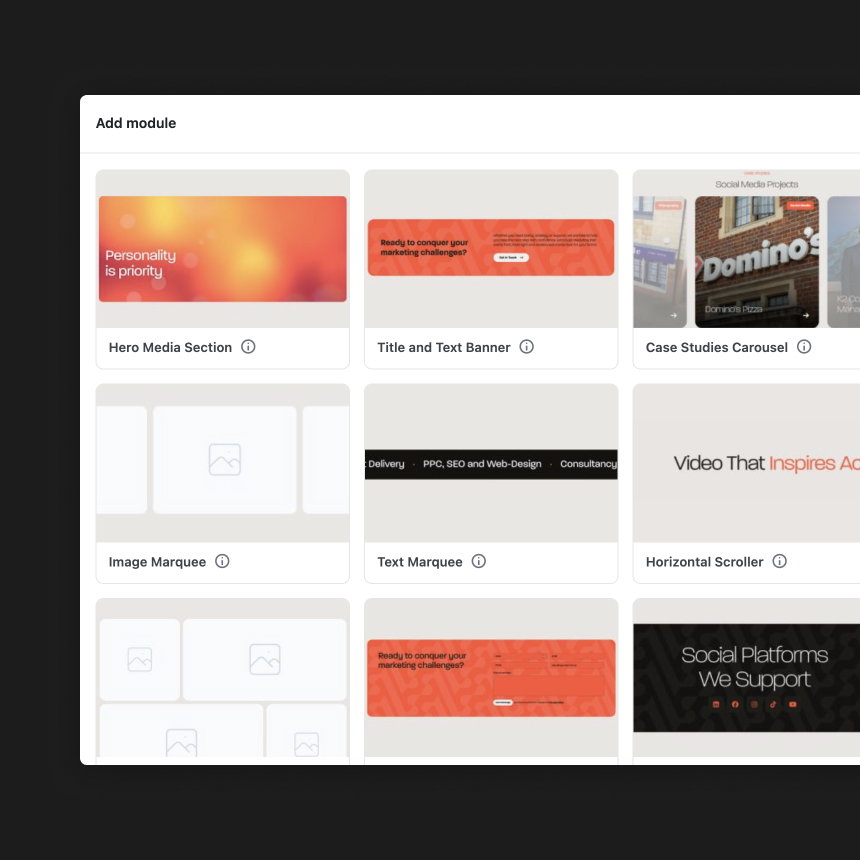
This is a custom WordPress plugin I built to make page building visual. It upgrades the standard Advanced Custom Fields (ACF) flexible content system so that instead of just picking layout blocks from a plain text list, users can see actual image previews of what they are about to add to the page.
The Challenge
By default, ACF only gives you a basic list of names (like “Text Block Option B” or “Feature Grid 2”) when you want to add a new section to a page. It’s a total guessing game. Developers have to memorize what every name means, and it’s even worse for clients. They have no idea what they’re clicking on, which makes page building frustrating, slows down training, and leads to them accidentally picking the wrong layouts and messing up their pages.
The Solution
I fixed this by developing a plugin that assigns a clear preview image to every single module. Now, when a client or developer wants to build a page, they get a clean, visual guide. You just look at the pictures, find the exact layout you want, and click to add it. It has made the development process much faster for us, and it makes training clients a breeze because they can confidently manage their own websites without needing us to hold their hand.